
Installation
ImgScan needs no installer. It is delivered as a folder that you copy to the computer.
System requirements
| Item | Requirement |
|---|---|
| Operating system | Windows 10 or 11, 64-bit |
| Processor | x64. ImgScan uses several cores. |
| Memory | 8 GB or more recommended |
| Disk space | About ten times the size of the input image, free on the drive of the %TEMP% folder, plus the size of the output file |
| Licence | An ImgScan licence for the computer |
Install ImgScan
- Copy the delivered
ImgScanfolder to a local drive, for example toC:\ImgScan. - Check that the path contains no spaces and no commas.
- Check that the folder contains
Exe,In,OutandRun.bat.
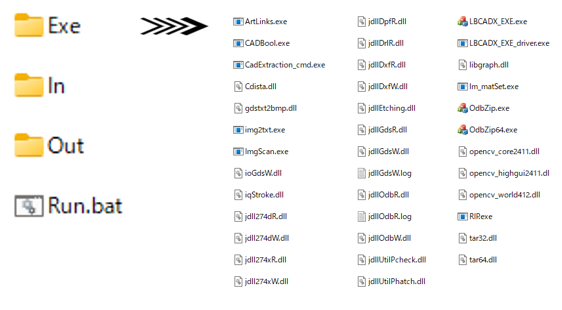
| Folder or file | Contents |
|---|---|
Exe | ImgScan.exe and the programs and libraries it uses. Do not move, rename or remove anything in it. |
In | Suggested location for input images |
Out | Suggested location for the CAD files ImgScan writes |
Run.bat | Example batch file, see Your First Conversion |
Path rules
- No spaces or commas. ImgScan reads
=and,as separators, and a path with a space is cut off. Quoting the path does not help. This applies to theImgScanfolder, the image and the output file. - Short program folder for ODB++. For ODB++ export, the full path of
Exe\OdbZip64.exemust be shorter than 128 characters. Install ImgScan close to the root of a drive, such asC:\ImgScan. A longer path stops the run with exit code 1028.
Licence
ImgScan is licensed for one computer and for a limited period, which Oscillated Recall Technology renews before it ends. If ImgScan reports License is not set to this PC, the licence is missing, belongs to another computer or has expired: contact your supplier.